

How to generate a complete study guide in 4 steps
- 1
Add your lecture materials.
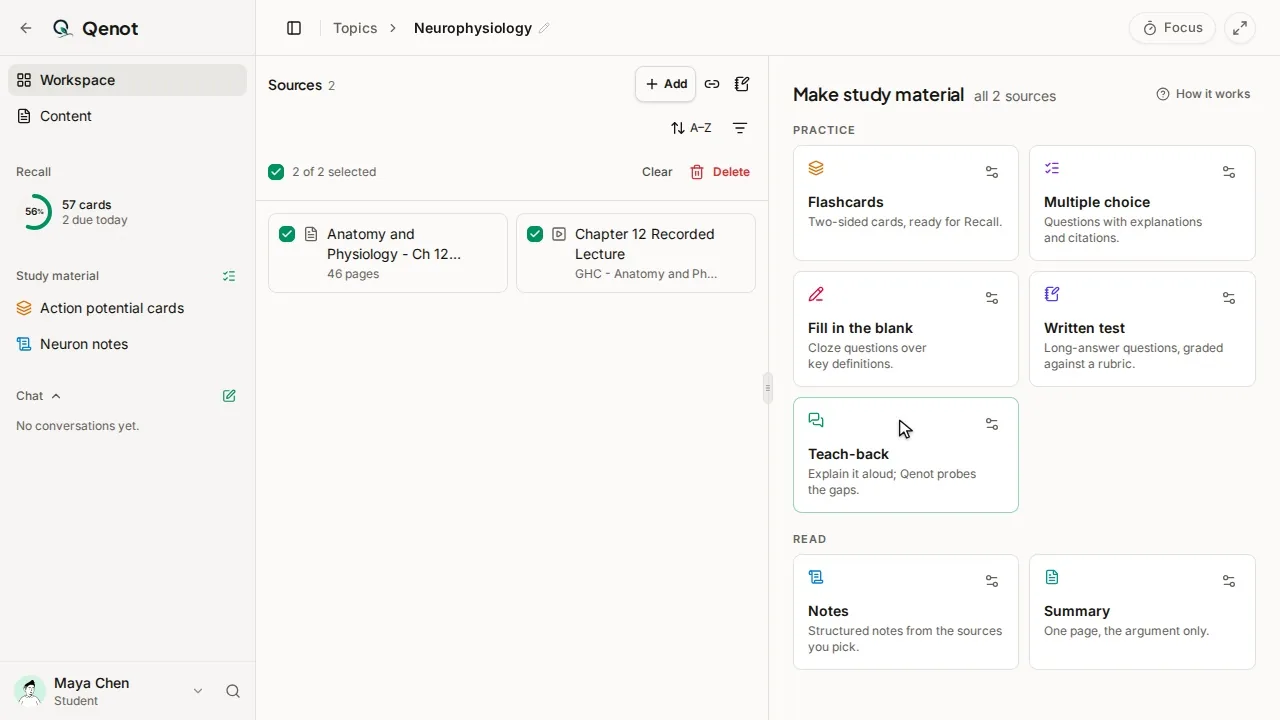
Drop your lecture slide decks, syllabus PDFs, textbook chapters, or YouTube lecture links into a course topic. You can combine an entire 4-week module into one study space.
- 2
Select your study guide components.
Choose what you need for exam preparation: chapter-by-chapter concept summaries, active recall flashcards, fill-in-the-blank drills, or multi-format practice tests.
- 3
Study with clickable slide citations.
Work through the material actively. Every summary point, flashcard, and test question links directly to the exact page, slide, or video timestamp where it was taught in your course.
- 4
Retain key concepts with spaced review.
Missed test items and difficult flashcards automatically schedule into your Daily Recall Ring, prompting retrieval right before memory fades.
Why modular study guides outperform 30-page text documents
- Overcomes the fluency illusion: Reading through a 30-page bulleted document feels effortless, but cognitive research shows re-reading produces minimal retention under exam pressure. Modular guides force active retrieval.
- Organized in syllabus order: Key concepts, formulas, and clinical scenarios follow the chronological sequence of your course, making it intuitive to locate topics during exam prep.
- Every claim is source-verified: Unlike generic chatbots that hallucinate plausible-sounding facts, every item in your Qenot study guide links to your professor's slides or assigned reading.
- Multi-modal exam preparation: Seamlessly switch from high-level chapter summaries to rapid-fire terminology flashcards, rubric-marked written questions, and interactive Teach-Back.
Study guide templates vs. Generic AI vs. Qenot
| Capability | Canva / Word Templates | Generic AI (ChatGPT) | Qenot Study Guides |
|---|---|---|---|
| Source Grounding & Citations | None; manual copy-pasting required | High hallucination risk; unverified claims | Grounded in your uploaded slides and PDFs; clickable citations to exact pages and timestamps |
| Active Retrieval Integration | Static reading document; passive review only | Unstructured text dump; requires manual prompt crafting | Instant conversion into 4 active testing modes: flashcards, quizzes, written rubric grading, and teach-back |
| Synthesis Time | 8–15 hours spent formatting boxes and margins | 30–60 minutes copy-pasting prompts back and forth | Complete modular guide generated from your lecture files in under 60 seconds |
| Memory Retention System | None; relies on last-minute cramming | None; one-off chat sessions forgotten the next day | Native FSRS spaced repetition scheduling with Daily Recall Ring |
| Exam Room Simulation | None | Basic multiple-choice guessing | Timed past exam simulation with partial-credit rubric scoring |
| Data Portability | Static PDF export | Raw copied text | 1-click Anki CSV export, printable cheat sheets, and Cornell note layouts |
The cognitive science of effective study guides
In an exhaustive review of learning techniques across hundreds of empirical studies, cognitive psychologists rated passive study guide practices—such as re-reading summaries, highlighting textbooks, and recopying notes—as possessing low utility for durable retention (Dunlosky et al., 2013). These habits foster the fluency illusion (Karpicke, Butler, & Roediger, 2009): students mistake the ease of recognizing familiar text for true conceptual recall.
In contrast, the most effective study guides function as active retrieval engines (Roediger & Karpicke, 2006). Reconstructing knowledge from memory alters memory structures, creating durable neural pathways that hold under exam room conditions. Qenot designs your study guide around this principle: converting lecture notes into active recall flashcards, diagnostic quizzes, and structured teach-back prompts that test mastery before test day.
Worked example: Physiology Final Exam Study Guide
When preparing for a comprehensive Human Physiology exam covering G-Protein Coupled Receptors (GPCRs) and second messenger signaling (OpenStax Anatomy and Physiology 2e, Chapter 17), Qenot breaks a 60-slide lecture into three active components:
- Governing Mechanism Summary: Contrasting Gs (adenylyl cyclase activation, cyclic AMP, Protein Kinase A phosphorylation) vs Gi (inhibition) vs Gq (phospholipase C, IP3 calcium release, DAG, Protein Kinase C), paired with clinical toxins such as Vibrio cholerae ADP-ribosylation locking Gs in the GTP-bound active state.
- Active Recall Deck: 12 cloze-deletion cards testing pathway intermediates (e.g., "Phospholipase C hydrolyzes PIP2 into [...] and [...]" → IP3 and DAG).
- Diagnostic Practice Test: A 5-question multi-format exam module evaluating secondary messenger regulation during autonomic sympathetic stimulation, complete with point-by-point rubric criteria and slide citations.
Supported study guide formats and exam workflows
- Midterm module packages: Consolidate 3 to 4 weeks of dense lecture slides into a structured exam review topic.
- Cumulative final exam syntheses: Connect entire semester course units, highlighting recurring mechanisms and high-yield formulas.
- 1-page cheat sheet summaries: Distill governing equations and boundary conditions onto a single Letter sheet or index card via our browser cheat sheet maker.
- Printable Cornell study sheets: Export structured notes with 2.5-inch cue margins and summary sections for paper-and-pencil active recall.
Common questions
What is the difference between a study guide and class notes?
Class notes record what was covered during a lecture. A study guide reorganizes that material for exam retrieval: synthesizing main ideas into structured summaries, identifying governing formulas, and generating practice questions to test whether you can recall the concepts without looking.
Can I make a study guide from PowerPoint slides and lecture PDFs?
Yes. You can upload PowerPoint slides (.pptx), PDF lecture handouts, scanned readings, syllabus documents, and YouTube lecture links. Qenot indexes the core terminology, diagrams, and explanations directly from your course files.
How does Qenot prevent AI hallucinations in study guides?
Qenot is grounded exclusively in your uploaded course materials. Every concept summary, flashcard, and practice test question cites the specific slide, textbook page, or video second it came from, allowing you to verify any answer against your professor's source.
What question formats are included in Qenot study guides?
Qenot generates four distinct active testing formats: multiple-choice with distractor rationales, fill-in-the-blank terminology drills, written open-ended problems graded against point rubrics, and interactive Teach-Back prompts where you explain mechanisms in your own words.
How does a modular study guide prevent the fluency illusion?
The fluency illusion occurs when re-reading notes feels easy because the material is familiar, leading students to believe they have mastered it. Qenot prevents this by transforming passive summaries into active recall flashcards and practice tests, proving what you actually know before exam day.
Can I make study guides for individual exam units or midterms?
Yes. You can select specific lecture slides or chapters within a topic to generate a focused study guide for an upcoming quiz or midterm, or combine all course topics into a comprehensive finals review.
Is it free?
You can start free with no card: past exams, study sets, chat and teach-back for up to 5 topics and 5 projects, with Recall and the focus timer unlimited.